Here I would like to introduce a nice talk held by Google Tech Talks on 8 OCT 2007, talking about "Implementing Drupal".
I found it' s really nice, detailed and I think you will be interested if you wanna have a more thorough understanding on Drupal.
Here is the link: Link
It's a about 52mins-long youtube video. You may also drag the time line to wherever you like according to following parts of the talk:
11:00 Killer Modules
1800 Drupal 6 intro
2030 Drupal 7 intro
2159 Links Resouces
2500 Drupal example - Edutopia.org
4600 Drupal vs Joomla
The part for "Drupal vs Joomla" is recommended, no matter you are a Drupal fans or Joomla fans, I've been waiting for such an objective view on these two great cms.
Enjoy!
Enjoy Drupal! :)
Showing posts with label module. Show all posts
Showing posts with label module. Show all posts
Monday, August 3, 2009

Wednesday, July 1, 2009
Embed Youtube/ other 3party video
Instal the Drupal module called embedded video from http://drupal.org/project/emfield
After that, add this field to any content type you wanna put into. (Addr: /admin/content/node-type)
Select Manage field and then add a field called embedded video.

After that, every node created using this content type contains an embedded video field. Simply copy the youtube link like http://www.youtube.com/watch?v=K7KhcEAmCxQ&feature=related and the video can be shown. It does save steps in copying object tags to display youtube videos.
You can check what type of video could be embedded in /admin/content/emfield. Configuration can be as well done there.
PS. Not only video can be embedded, even flickr or other kinda media can be embedded. This can be achieved by enabling Embed media module from /admin/build/modules.
After that, add this field to any content type you wanna put into. (Addr: /admin/content/node-type)
Select Manage field and then add a field called embedded video.

After that, every node created using this content type contains an embedded video field. Simply copy the youtube link like http://www.youtube.com/watch?v=K7KhcEAmCxQ&feature=related and the video can be shown. It does save steps in copying object tags to display youtube videos.
You can check what type of video could be embedded in /admin/content/emfield. Configuration can be as well done there.
PS. Not only video can be embedded, even flickr or other kinda media can be embedded. This can be achieved by enabling Embed media module from /admin/build/modules.
Saturday, June 6, 2009
Install Slideshow Creator - Created by Yubis IT Solutions
Modules Needed:
1. Slideshow Creator -
dl link: http://drupalmodules.com/module/slideshow-creator
2. jQuery_plugin -
dl link: http://drupalmodules.com/module/jquery-plugins
Steps(Using drupal 6.x):
1. Site Configuration => Input format=> Configure => Tick SlideShow
2. Create a page => insert codes example in reference below to the "Body" section
Sample Code(for Testing):
To create a directory for images included in the slideshow:
(suppose the images placed in www\drupaltest\sites\default\files\frontpage_slideshow)
Other attributes can be shown in the README.TXT
Reference:
README.TXT in the module folder
Reference Link:
http://blog.csdn.net/bright60/archive/2009/01/04/3702890.aspx
1. Slideshow Creator -
dl link: http://drupalmodules.com/module/slideshow-creator
2. jQuery_plugin -
dl link: http://drupalmodules.com/module/jquery-plugins
Steps(Using drupal 6.x):
1. Site Configuration => Input format=> Configure => Tick SlideShow
2. Create a page => insert codes example in reference below to the "Body" section
Sample Code(for Testing):
[slideshow: 2, img=|http://drupal.org/themes/bluebeach/logos/drupal.org.png|drupal.org|Drupal|The ultimate CMS. Download it now!|Drupal|, img=|http://www.mysql.com/common/logos/mysql_100x52-64.gif|http://www.mysql.com|MySQL|Free and reliable SQL server and client.|_self|, dir=|files/|yes||Generic Photos|Arent they great?||]To create a directory for images included in the slideshow:
(suppose the images placed in www\drupaltest\sites\default\files\frontpage_slideshow)
[slideshow: 2, rotate=6, blend=3, dir=|/frontpage_slideshow/|yes||Generic Photos|Aren't they great?||]Other attributes can be shown in the README.TXT
Reference:
README.TXT in the module folder
Reference Link:
http://blog.csdn.net/bright60/archive/2009/01/04/3702890.aspx
Install Slider - Text
Modules Needed:
Slider - dl link: http://drupalmodules.com/module/slider
Steps(Using Drupal 6.x):
1. Install modules
2. Add content type:
Administer => Content Management => Content Type => Add
Slider Parent Node (slider_parent_node) , Slider Content (slider_content)

3. Slider Parent Node Configure => Add field =>
slider_content(Type:node_reference, configure=>Tick Slider Content)
Slider - dl link: http://drupalmodules.com/module/slider
Steps(Using Drupal 6.x):
1. Install modules
2. Add content type:
Administer => Content Management => Content Type => Add
Slider Parent Node (slider_parent_node) , Slider Content (slider_content)

3. Slider Parent Node Configure => Add field =>
slider_content(Type:node_reference, configure=>Tick Slider Content)
4. Site Configuration => Slider => Tick Slider_Parent_Node
5. Create content => Slider content => type sth like what you do in a pag
6. Create content => Slider Parent Node => like Step 5 but highlight the slider content node to be included in "input format" section
7. Finish
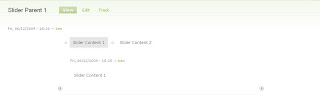
Other Example: http://www.yubis.net/

5. Create content => Slider content => type sth like what you do in a pag
6. Create content => Slider Parent Node => like Step 5 but highlight the slider content node to be included in "input format" section
7. Finish

Other Example: http://www.yubis.net/

Friday, June 5, 2009
Install getid3 module
Like FCKeditor, we need to download the actual engine together with the Drupal module to make it work.
After standard procedure to install a module, download the getid3 engine from http://prdownloads.sourceforge.net/getid3. Then, go to admin/site config/getID3. Confirm the path to include the getid3 engine. Then, decompress the getid3 engine just downloaded and put the getid3 folder to the path you entered.
After standard procedure to install a module, download the getid3 engine from http://prdownloads.sourceforge.net/getid3. Then, go to admin/site config/getID3. Confirm the path to include the getid3 engine. Then, decompress the getid3 engine just downloaded and put the getid3 folder to the path you entered.
Install FCK editor
FCKeditor is a great tool for you to make page layout. You don't want to make a page with many different fields like images/links/bullets/font style and so on. FCK editor helps to format your page. The text area input box will become the Word-like editor for easy formatting.

To install it, download Drupal module from Drupal website. Extract it to sites/all/modules as usual. However, the fckeditor contains another folder called fckeditor. What to put inside this secondary fckeditor?
Download the actual FCKeditor files to fckeditor/fckeditor. (http://www.fckeditor.net/download). It is suggested to remove the _sample/ directory when copying.
After that, install the module. You'll see admin/site config/FCKeditor when finish.
Thursday, June 4, 2009
The Making of gallery

Way to make a simple gallery. First, download the Image module from Durpal website. In admin/site config/, you'll find the one of "Images". Select "Image import".
Then, input the correct path which contain the pictures you wanna include in your gallery. Note the photos there will be removed away after Drupal copy them to sites/default/files/images. Press save config if ready.

Then, click "import" from the message box and you'll see a list of pictures you've just uploaded. Add title (title of the page, displayed on top of page and on browser top) and body (i.e. text below the picture)

Select the photo gallery (i.e. the album) to include all of these pages.


You can click on the links to see how the pages look.

* To create a gallery (i.e. an album), click: Admin/Content Management/Image galleries/Add galleries
** Root gallery can include its child galleries. Remember to mark the root gallery for the children. (Ref. site addr: http://localhost/drupal-6.12/image)
*** To set the thumbnail's size, click: admin/site config/images/files and sizes
Wednesday, June 3, 2009
Install Modules
Many Drupal Modules are available in Drupal. They can be downloaded from: http://drupalmodules.com/ After downloading Drupal modules, decompress them and place them into sites/all/modules. The Drupal modules can be seen from Home/Administer/Site building/modules page of Drupal.


** Similarly, to install a theme, place the theme into sites/all/themes


** Similarly, to install a theme, place the theme into sites/all/themes
Subscribe to:
Posts (Atom)